Monday, January 30, 2012

JuJu Hearts

What do Juju Heart candies have to do with Valentine Day greeting cards? Juju hearts are just my most favorite taste of sweet cherry chewy gooey goodness. Chocolate is really my favorite candy choice but you can get chocolate anytime of the year. When Winco Foods starts filling their bulk bins with Juju Hearts, that signals Valentine's Day card sending is around the corner.

Fill your candy dish with these sweet morsels to snack on while you create a Valentine's Day card from scratch with your own photos and the SendOutCards Templates and Elements from the new BE MINE or the original VALENTINE categories. There you will find a wide selection of pretty AND cute Valentine designs. Or, choose from the hundreds of stock Valentine's Day greeting cards in the SendOutCards holiday category; that will leave more time to eat even more Juju Hearts . . . Yikes!

Attention small business owners: Sending a simple Valentine's Day greeting card to your customers telling them that you LOVE having them as a customer, will make them love you even more than they love you already!!! Use the great "Campaign" and "Insert Name" features to send a personalized card to an entire group of people. How simple is that?

HAPPY CARD SENDING!

Thursday, January 26, 2012

Forget Love! I'd rather fall in chocolate

OK, so admittedly, I chose this Valentine's Day greeting card last year to send out for most of my Valentine's Day cards. It really isn't my sentiment but I thought it was such a CUTE and FUNNY Valentine's Day greeting card. Plus, I do LOVE chocolate, but not more than I love my valentine, Howard!

Sometimes people just need to open a card and get a laugh. You know, "laughter is the best medicine"! If a greeting card I send brings a tear of happiness or a smile on someone's face, it makes MY day!

I love how the Valentine's Day category in SendOutCards has subcategories for family and even more subcategories under that. It makes finding a card so much easier. Of course, most of the time I go to the HUMOROUS subcategory to check those out first.

Enjoy searching for your favorite Valentine's Day greeting card in your pajamas instead of standing in a store's crowded card isle. If you see lots that you like, click on the icon ADD TO FAVORITES. Then, when you have looked long enough, go to the category called MY CARDS and the subcategory FAVORITES to choose between your top few favorites. Pretty simple!

Happy Valentine's Day Card sending!

Saturday, January 14, 2012

SendOutCards Just Keeps Getting Better

I love the two-fold mission of SendOutCards:
  • to help millions of people act on their promptings to reach out in kindness
  • and to provide a vehicle for financial freedom.

After an exciting weekend at a SendOutCards training, I know just how serious the company is about their mission. Last May they dropped the upfront fees on the RETAIL customer accounts and they added over 65,000 customers who now may easily, from their computer, send a heartfelt card ANYTIME the thought comes to them. Besides all that goodness being spread, my residual check from the company increased over 400% from last January to this January! With the new PREFERRED PRICING Account announcement this month, I am looking forward to what this year will bring!!!

That's right, now our upfront fee of $398.00 to get the wholesale pricing of .31 a point is GONE! Such great news! Now you may send postcards costing ONLY .31 and regular greeting cards JUST .62!!! And, of course you know, you get those great prices and SendOutCards prints the card, addresses it, stuffs it and puts it in the post office FOR YOU! EASY!

The possibilities ARE endless!

For any of you wanting to make some extra money, they even lowered the cost to start a distributorship to $295.00, added more bonuses and even a way you may quickly, earn 100 free points into your system MONTHLY. That is $31.00 worth of free product every month. Because we are growing so large, they also implemented a certified training program whereby those who are certified may get paid to train new distributors. They have added lots of ways to earn extra income while building your SendOutCards business.

SendOutCards just keeps getting better!

Friday, January 13, 2012

Screaming Exciting News

Last weekend SendOutCards made the exciting announcement to drop the upfront fee of $398.00 to the old Wholesale Premium Package and create the new PREFERRED PRICING Subscription Account! By simply purchasing 100 points a month, only $31.00, customers may now send out a regular greeting card for only 62 cents (.31 per point): printed, stuffed, addressed and dropped in the mail for you! NO MORE UPFRONT FEES for Customers!

It also means the Preferred Pricing customer may buy gifts from our catalog at the preferred wholesale pricing. Have fun sending boxes of melt-in-your-mouth truffles, decadent brownies or the amazing birthday candle that sings Happy Birthday, twirls and shoots fireworks!

Three great customer choices now: Retail Subscription Account starting at $9.80 (points are .49) or the new Preferred Pricing Subscription Account at $31.00 (points are only .31) and the Pay-As-You-Go Account. Plus, on these subscription accounts, you always get the lowest price, there is no contract, points roll over to the next month so you can "bank" them for future holidays or invitations and you may cancel at any time. Incredible!

Monday, January 9, 2012

I Love the Calendar Cards!


Have you seen the calendar cards that SendOutCards added recently? If you want to send a thoughtful greeting to wish the best for the new year, these are a great solution. Most have a beautiful picture, an inspiring message and a handy year-at-a-glance calendar.

If you have a business, most of these cards have room below the calendar to add a text box. Your name and phone number will be easily accessible and even visible to your client’s co-workers ALL YEAR LONG since the card may be displayed on their desk!Link

The tutorial called Creating a PicturePlus 2.0 card describes adding elements and templates, tilting them and moving them around. Use the same technique when using a text box but you add a text box anywhere on the inside of your card by clicking the ADD BLANK TEXT ITEM button below the Picture, Templates and Elements buttons on the left hand side of the PERSONALIZE IT editing page. Realize though, the calendar cards are not PicturePlus cards (unless you add a photo on the inside of course). These are regular stock greeting cards and only cost 62 cents (.98 for Retail Subscription Accounts) to send out. AMAZING!

Go to the Special Interest category and then to the Calendar Cards sub-category to take a look at the selection of calendar cards in the card catalog.

For those of you who were too overwhelmed to send holiday cards, sending a card in January with a calendar or a New Years greetings from one of our many Happy New Year cards will make it look like that was your plan from the beginning!!!

My next blog will be an exciting announcement about the newest Preferred Pricing Subscription Account announced this week: wholesale pricing with NO UPFRONT FEE! If you have any questions, call me at 503-524-1111.

Happy Card Sending!

Thursday, December 29, 2011

Using Campaigns for Christmas Thank You Cards

Did you get a lot of gifts? Do you need to write a lot of thank you cards? This post will show you how to easily send out personalized thank you cards to many people with a few quick clicks using the campaign feature of SendOutCards.

A campaign is a card or series of cards that are saved in your SendOutCards account so you may use them again and again. If you are not familiar with campaigns, watch this short video: How to Create and Send a Campaign.

From your Main Menu Page, click on CREATE A CAMPAIGN. Name your campaign and check that the default address is how you want it. Note: If you change the default address, scroll to the bottom of the page and click on Save Campaign. That button saves any changes you made to that particular page.

Click on the button that says CREATE A NEW CARD FOR THIS CAMPAIGN. Continue through the card 1 page (this is here for campaigns with multiple cards like a drip campaign) to get to the Card Catalog. For a Christmas Thank You Card, I click on the EXPRESSION category, then THANK YOU sub-category and then GIFT sub-category. My favorite card is the snow man card with the inside message "It was really cool!" Isn't that a cute message!!
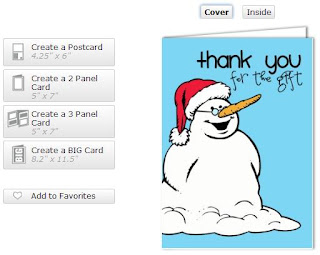
Once you find a card, click on it and choose Create a Two Panel Card. On the edit page, write a simple message that fits for most everyone. When you are writing a lot of thank you cards, you usually have a similar message in each card. This is where you might briefly describe your holiday and say you loved your gift. Be sure to leave room on your card for a personalized message about how you might use the gift (which you will add later). Your simple message that you write just ONCE on the campaign card helps you to write a wonderful note to everyone; all your heartfelt thank you cards get done without getting writer's cramp!

You may use the INSERT NAME feature on the text box tool bar to have the recipient's name automatically populate on each card. Example: By Choosing Insert First Name, whatever is in the first name cell of your recipient's Contact Page (whatever shows up on the envelope page of the Card Editor) will populate on the inside of the card. Lastly, sign your card. If you don't have your handwriting font in your system yet, it is fun to make your signature look different by choosing a different color or font.

Click Print Preview to see if your alignment and margins look correct and then click CONTINUE then, CONTINUE WITHOUT GIFT until you get to and click the SAVE CARD, GO BACK TO CAMPAIGNS button.

YOU DID IT; you created a simple card to use over and over again! You may even add photos inside the card of you opening the gift or if you prefer, create a PicturePlus card with your Christmas photos . . . there is a tutorial on that of course (HELP section on your Main Menu Page red line: How to Use PicturePlus 2.0)! Remember, you may also make this card a postcard to save on postage . . . lot's of choices!

To send this card to someone who gave you a gift, find the person by going to FIND A CONTACT under CONTACTS on your Main Menu Page Red Line. From their Contact Page, select from the drop down box at the top of the page the campaign card you just created and click on SEND CAMPAIGN TO CHECKED. SendOutCards will ask permission to continue after telling you the cost. Click CONTINUE.

IMPORTANT (to make each thank you more personal): To add a special note about this particular present, find the card in your Card History and edit it. Warning: When you edit a card, you must continue through all the pages and click SEND CARD again to send that edited card. It might feel as though you are sending a second card but you are just telling SendOutCards that you are serious about the changes that you made to that particular card. Another warning: Make all changes to sent cards before 12:00 midnight Mountain Standard Time since that is when our cards get pulled for processing.