Tuesday, March 13, 2012

But I lose the inside of my card!

Yes, it’s true. When you choose the POSTCARD option from the SendOutCards card catalog, if your card had an inside message, it does not appear on the back of your postcard. It is a matter of giving you more space to write your heartfelt message of the back of the postcard. But if you just LOVED the inside message, this is all you have to do . . . On the pop up window where you choose the POSTCARD button:
  1. First click the INSIDE button at the top
  2. Highlight the words below the card where you see the message written in regular type then right click to choose COPY or copy it (CONTROL C)
  3. Now click the POSTCARD option
  4. On the “Personalize It” page (where you are taken to write your message), click in the box that says, “Click here to type your message”
  5. Paste that previously saved inside message: Hit CONTROL V or right click to choose PASTE

You might need to hit your space bar to activate the inside of the text box. You may also want to resize the words so you have enough room to write your personal message below or above it. There you have it! You didn’t even need to memorize the cute verse to retype it. Cute postcard!!! Brighten someone’s day with a cheery postcard sent in the mail to remind them that Spring is around the corner and wish them a joyful Spring . . .

Happy Card Sending!

Sunday, March 11, 2012

New St. Patrick's Day Greeting Card Designs

No, I am not Irish! Well, I guess I do have a wee bit of Irish in me from my Patterson ancestors on my mom's side! Nevertheless, I just wanted to give you a glimpse at some of the fun Templates and Elements found in the newest designs for customized cards for your St. Patrick's Day greeting cards. My last blog just mentioned the stock cards for this holiday. But the holiday is coming up fast, so take a look today and click that SEND CARD button!

I am LOVING those new Templates and Elements to use to create a customized St. Patrick's Day greeting card! Ready to enhance your own digital photos, our last year's PicturePlus designs are in the Template and Element category: St. Patrick's Day, and this year's new designs are in the category: St. Patty's Day. I LOVE the rich colors in this year's designs. But, if you are looking for a more cute selection of Templates and Elements for St. Patrick Day's greeting cards, you will find that mostly in last year's category. In last year's St. Patrick's Day Elements, you will find a cute leprechaun and even a pot of gold to go along with a message wishing prosperity to any of your clients or business associates . . .Hint: The Elements in any category may, of course, be used in ANY greeting card design and since I am a lover of the color green, I have used bits and pieces from both the St. Patrick's Day categories. It is just a matter of using the Templates and Elements enough to remember where you find your favorite pieces.
Happy St. Patrick's Day Card Sending!

Friday, March 9, 2012

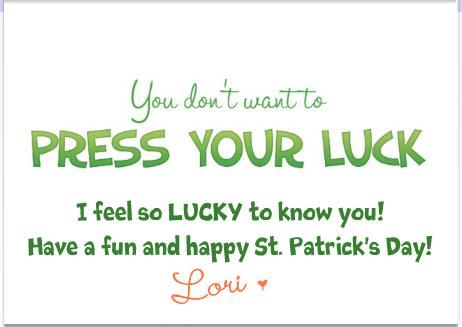
You Don't Want to Press Your Luck!

Take a look at the great selection of St. Patrick's Day greeting cards we have. SendOutCards is always adding new greeting cards to the Card Catalog. Just go to the HOLIDAYS category, then to the OTHER HOLIDAYS subcategory and click on St. Patrick's Day to find just the right card. And remember: You may always override the inside of the card if the message on the inside isn't perfect for you!
TIP: When you want to change the inside message of a stock greeting card, click on the words "click here to type your message" and then scroll to the bottom of the card and you will see the OVERWRITE MESSAGE button. Clicking on that, gives you a blank inside so you may write whatever you choose.
The inside message makes me laugh on this greeting card. Don't you just love this??? I guess I lean towards the funny greeting cards much of the time. But, there are quite a few more serious ones and what an excellent excuse to tell your loved ones, friends and customers that you feel lucky to know them and have them in your life!

Now, don't press your luck . . .
BE SURE the people in your life know you care about them!

Happy Card Sending!
And, have a Happy St. Patrick's Day!!!

Thursday, March 8, 2012

Speaking of Signatures

Since I last spoke of gathering signatures for cards from a group of people like an office or family, I would like to share some tips I use concerning signatures. First off . . . I LOVE, LOVE, LOVE having my own signatures in my account. I have the personal font option which comes with four signatures. Some of you received TWO personal fonts; I'm jealous!

You can also pay to have just four signatures added without the personal font. Someday, I want to buy more signatures to add to my account since I have other names like Mom, Grandma, and Halmoni and because I LOVE the ease of using my REAL signature on my greeting cards, the fact that I can make my signature in any color and on any background. It was like Christmas the day my signatures and personal font appeared in my account; I was so thrilled! Well, actually it WAS just before Christmas.So here is a detail about personal signatures: One of my signatures has a lot of white space around it, spacing it at the end of my message far lower than I want on my greeting card . I learned the solution to this while helping one of my customers, Kathi Knowles. I love answering questions for customers since I usually learn more tricks as well (two heads are ALWAYS better than one)! Now, I add a separate text box just for my signature. That makes it so I can overlap the text boxes to get rid of the extra white space. A separate text box just for my signature also allows me to twirl my signature so it can be at an angle. Oh, how I LOVE the twirl button!!!

And for those of you who did not purchase the personal font option (or have procrastinated filling out your font form . . . and believe me, you procrastinators are not alone), you can have the same fun with your "signature" by using a separate text box. I usually choose a different font to sign my cards when I am not using my "Lori B" signature and usually I use a different color.

Just add a little fun to your cards. Everyone likes to have a little chuckle and put a smile on someone's face. It will put a smile on your face also as you think of the person when you click SEND CARD!
Happy Card Sending!

Monday, February 27, 2012

Greeting Cards from Your Office Staff

Our loved ones, no longer with us, leave footprints in our hearts.
Impressions of kind acts, loving words & happy memories.
These prints build a path for us to follow which always
lead to warmer places and brighter days.

In any business, there is bound to be the need for a sympathy card now and then. Better than taking the time to send someone to the store and then the days afterward to track down everyone in the office to sign the card, use some pre-planning with your SendOutCards service.

Gather signatures from all the office staff, scan them into your computer and save in JPEG format. Upload them as separate images to your SendOutCards account. I save all my signatures in a separate album labeled SIGNATURES in my photo library within my account.
When the time comes that you need a greeting card, pick one from our excellent selection, write a few lines of condolence and then drag the appropriate signatures onto the card . . . all in a matter of minutes!!!

An even faster solution to greeting cards sent from a group of people: gather signatures on both a horizontal and a vertical piece of paper. Tape in a 3x5 card so no signatures are placed in the middle of the page, leaving it blank for your future message. DO NOT include your own signature. Scan the page without the 3x5 card and upload into your SendOutCards photo library.
When you pick out your next greeting card, drag the entire image (vertical or horizontal depending on the greeting card that you chose) into the card. If the card is going to a staff member, place your individual signature image over the recipient's signature (so they aren't signing their own card of course). Type in your text in that blank area in the middle in a nice font (my favorite for a card like this is CURSIVE PEN) and your card is done and on its way to arrive in a timely fashion and it took less than few minutes. Wasn't that easy?

I just described this process for a sympathy card but this may be used for any kind of greeting cards appropriate for office groups to send to build morale and better relationships: congratulations on the promotion, job well done, thinking of you, get well, retirement congrats, congratulations on the baby . . .

Sending a group wedding gift? Use the same process and add a Gift Card from our selection on our Gifting Page!!! Can't get any easier!
Happy Card Sending!

Saturday, February 25, 2012

SendOutCards Simplifies Sending Sympathy

Words seem inadequate to express the sadness
we feel for you during your time of great loss
.

One seemingly odd feature for which I am SO grateful to have my SendOutCards service is for greeting cards in the SYMPATHY category. They are there immediately when I need them; the timing couldn't be better.

I have several greeting cards in this category that are my favorites. It takes less than a matter of minutes to select one that is particularly right for the family in need even when I deviate from my favorites. And because I can override the inside message of a card, most of our greeting cards fit any difficult occasion.

I learned when my loved ones have passed away how absolutely meaningful it is to get a card with a small remembrance of the person who passed away. Since it takes so little time to pick out a card now with my SendOutCards service, I can spend a few moments thinking of a memory to share or a thought that might lift the recipient of my card. Although, with the card above, even if you don't have a few moments to write a few lines, a sincere "I am so sorry" fills the inside of this card with love.

I have a customer that would include old photos of the deceased in condolence cards that she created. She received so much joy as the families glowingly thanked her for that kindness. Personalizing a greeting card with a memory or a photo . . .can you just imagine the special feelings as that card is opened and reread many, many times?

I love the message on this greeting card. Even if I don't have a memory of the deceased to add, my knowledge of the characteristics of the friend to who I am writing can be highlighted.
If one should say to you that the soul perishes like the body,
answer that the flower withers, but the seed remains.

Just be compassionate to acknowledge the sadness. Verbal messages are important but may be forgotten in the early stages of grieving. A greeting card with a short note of sympathy can be referred to again and again throughout the grieving process. Comforting words in greeting cards are an important way of extending happier memories.

For the first few days of bereavement, there are lots of people around those who are grieving. Days and months later, when left alone, your note of condolence is often read for comfort, strength and to help them know that they and their loved one are being remembered.

My next blog will have a tip on sending sympathy cards from an office.
Happy Card Sending!

Tuesday, February 7, 2012

Tillamook Cheese shipped from Utah: What?

The shocking news here in Oregon this week: Our beloved, homegrown Tillamook Cheese will soon be shipped from Salt Lake City, Utah! Do they, or anyone outside of Oregon for that matter, even know how to pronounce Tillamook? I can just hear it now: Tillmooook; like it has something to do with the sound of a cow! Yes, workers at our ice cream and squeaky cheese stop on the coast are now being laid off. How can sending “our” cheese to another state have anything to do with streamlining the process?

Well, I feel badly for all those laid off workers/fellow loyal lovers of Tillamook cheese and ice cream. Makes me want to send them all a greeting card! And, of course, SendOutCards has a category for that! When you know someone who gets laid off from work and you don’t know what to say, SEND THEM A CARD to express your most simple “I care” feelings.

Just go to the category: Expressions, then Sympathy, then Workplace. I like the “I believe in you” message of first card that comes up in that category but the simple "I am sorry" message of the second card is a great one to send also. For a category with some nice inspirational messages go to: Keeping in Touch, then Motivational, then Series, then Life Lessons

A road without obstacles probably doesn't lead anywhere. (inside message)

Saying SOMETHING is always better than saying nothing at all. That is what I have learned in the couple of tragedies I have experienced in my little lifetime. Just say you care. . .